


Scale your scraping strategy with high-quality residential IPs ensuring stable connections, low latency, and cost-effective results.
Ask AI about Magnetic Proxy





Case Studies
Trust & Safety
Report Abuse© 2026 Magnetic Proxy. All rights reserved.



Most Python tutorials for scraping Google Maps share the same fatal flaw. They show you a Selenium script that opens a browser, scrolls through results, and parses the HTML. You run it, get 60 results, and then Google blocks you. You tweak the script, add some delays, try again. You get 120 results this time before the block hits. Eventually you hit the real ceiling: Google hard-caps results at roughly 200 per query, no matter what. Your script cannot scroll past what Google will not show.
That ceiling breaks most scrapers before they get started. If you are trying to collect every barbershop in New York City, or every dentist in Los Angeles, 200 results is not a dataset. It is a sample.
This guide uses a different approach. No Selenium. No browser. No API key. Just Python, a residential proxy, and an open source scraper that solves the 200-result problem with a grid-based method that divides the city into cells and scrapes each one independently. By the end, you will have a working CSV of real business data from Google Maps, with names, addresses, phone numbers, ratings, websites, and opening hours, ready to import into your CRM or analysis tool.
What is Google Maps scraping?: Google Maps scraping is the automated extraction of business data from Google Maps listings, including business names, addresses, phone numbers, ratings, websites, and operating hours. The data is typically exported to a structured format like CSV or JSON for use in lead generation, market research, or competitive analysis.
Google Maps blocking scrapers is not random. It follows a predictable pattern based on three signals that any automated request triggers almost immediately.
The first is the IP address. Google maintains extensive lists of known datacenter IP ranges from AWS, GCP, Azure, and similar providers. Requests from these ranges are flagged before your first query completes. It does not matter how good your scraping logic is. The IP is the tell, and datacenter IPs are recognized on sight.
The second is request volume. A single IP address sending hundreds of queries per hour does not behave like a human. Google's rate limiting kicks in fast, and the response you get is not an error. It is a CAPTCHA, or a results page with zero listings, or a redirect that silently kills your session.
The third is the 200-result ceiling. According to Google Maps Platform documentation, search results are limited per query regardless of the actual number of businesses in an area. A search for "restaurants in Manhattan" on the Maps interface will show you a scrollable list, but the underlying data caps out. Every scraper that queries Google Maps as a single search hits this wall.
Why does Google block Maps scrapers?Google blocks Maps scrapers primarily because automated requests from datacenter IPs trigger pattern recognition systems built into their infrastructure. Residential IPs from real home internet connections bypass these systems because they carry genuine behavioral signals that datacenter ranges lack entirely.
Residential proxies solve the IP problem. The 200-result ceiling requires a different solution: grid-based scraping.
Before touching a single line of code, it helps to see what you are actually going to get.
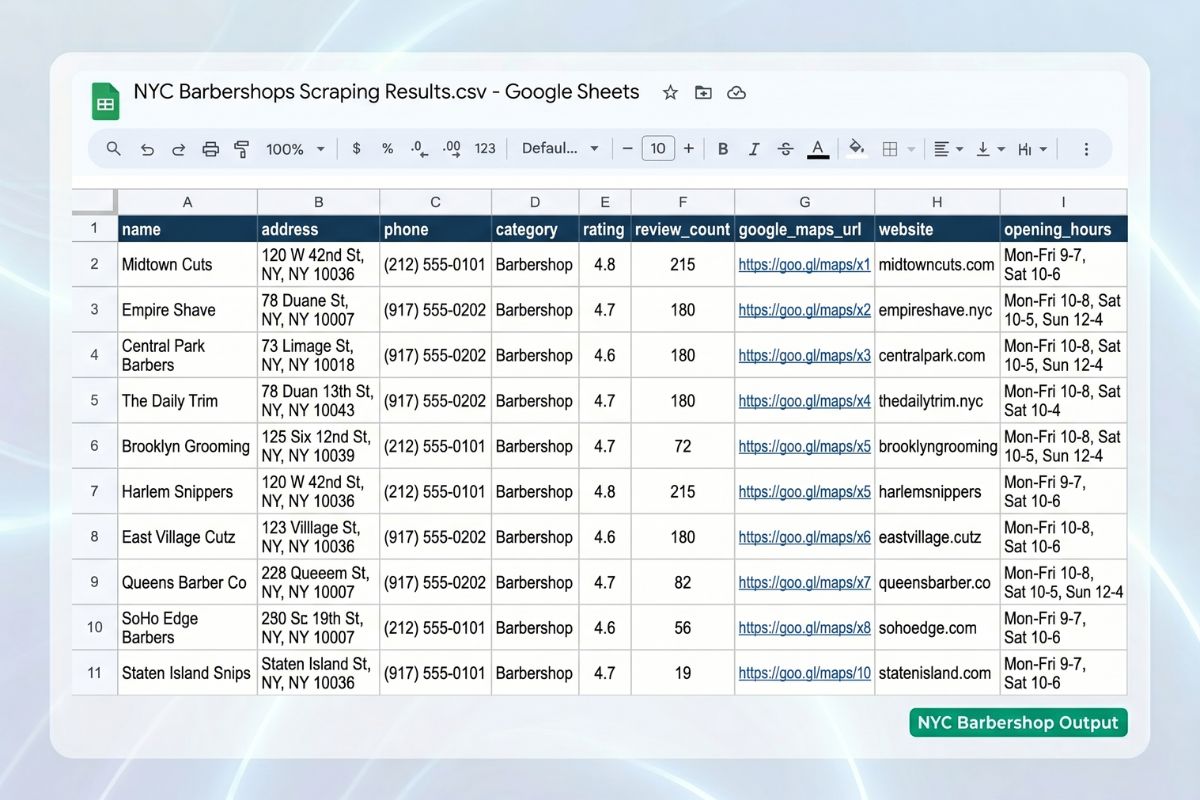
The worldscraping/google-maps-scraper repo exports 9 fields per business. Here is a real sample row from a scrape of barbershops in New York City:
Name is the business name as listed on Google Maps. Address is the full street address with zip code. Phone is the primary contact number. Category is the business type Google Maps assigns (Barber shop, Restaurant, Dentist, etc.). Rating is the average star rating. Review count is the total number of reviews. Google Maps URL is a direct link to the business listing. Website is the business's own domain. Opening hours shows current status and closing time.
For lead generation, the combination of phone, website, and address gives you everything you need to build a targeted outreach list and import it directly into a CRM. For market research, rating and review count let you map competitive density and quality across a city. For local SEO audits, the Google Maps URL gives you a direct link to each client's or competitor's listing.
The six primary use cases the scraper is built for: lead generation for sales outreach, market research for competitive landscape analysis, local SEO audits for client or competitor presence, data enrichment for existing business databases, sales enablement for pre-call intelligence, and content and reporting for data-driven market analysis.
Three things before running a single command.
Python 3.8 or higher. The scraper uses standard libraries available in any recent Python version. Check yours with python --version.
A Magnetic Proxy account. This is not optional. Running the scraper without a residential proxy means your requests come from a datacenter IP range, and Google blocks them at the first batch. The proxy is what makes the scraper work at any meaningful scale.

Size capacity from a bounded pilot: measure bytes transferred and usable records returned, then account for planned volume, retries, duplicate collection, and headroom. The illustration is not a fixed cities-per-GB tariff or a plan recommendation; use measured workload consumption and the current plan allowance.
A typical city scrape uses 1–3 GB of residential proxy bandwidth depending on city size and how many businesses match your query. A large metro like New York City or Los Angeles can consume 3–5 GB depending on business density and how broad your query is. Plan your bandwidth tier accordingly before starting a large operation. (Source: worldscraping/google-maps-scraper, Proxy Setup documentation)
For most use cases, the 10 GB plan from Magnetic Proxy gives you enough room for several city-level scrapes without running out mid-operation. You can start with a residential proxy plan starting at $5/month to test the full pipeline before committing to higher volume.
pip. The scraper installs its dependencies through pip. No conda, no virtual environment required, though using one is always good practice.
Four steps from zero to first results.
No Playwright installation. No Chrome or Chromium download. No WebDriver setup. That is one of the most important differences between this scraper and every Selenium-based tutorial you have seen. The scraper does not open a browser. It makes direct HTTP requests to Google Maps internal endpoints, which is faster, lighter, and significantly harder for Google to fingerprint as automation.
Most guides stop at this step and tell you the setup is complete. It is not. Without a working proxy, the scraper will run its health check, fail immediately, and tell you exactly why.
The scraper reads its proxy credentials from a .env file in the project root. Create it from the example:
Open .env and fill in your credentials from the My Proxies section of your Magnetic Proxy dashboard:
That is all the configuration the proxy requires. The scraper handles rotation, session management, and the retry logic automatically. When you run it, the first thing it does is a proxy health check. If your credentials are wrong or the connection fails, you find out immediately, before spending any bandwidth on the actual scrape.
This is also where you can optionally specify a proxy exit country using the --proxy-country flag. For US-based scraping, --proxy-country us forces the proxy to route through a US residential IP, which is relevant when your target data varies by location.
Keep exploring: See the Web Scraping Capsule for the relevant proxy setup, then read How to Scrape Google Search Results for the technical foundation.
The scraper will geocode New York City into a bounding box using OpenStreetMap, generate a grid of 2 km cells covering the entire city, and begin scraping each cell sequentially. Progress is logged to the terminal in real time. Results are written to CSV progressively, so you get usable data even if the scrape is interrupted before completion.
The output file is named with a timestamp: results_20260415_180000.csv. Open it in any spreadsheet application or import it directly into your database or CRM.
Get your proxy credentials in 2 minutes. Start with the 10GB plan with 30% off your first month using code PROXYSTART, enough bandwidth to run your first city scrape and validate the full pipeline.

The grid workflow divides the target area into smaller searches, collects each cell, merges the records, and deduplicates businesses by a stable identifier before CSV export. Overlapping cells can return the same business. Grid division does not guarantee complete coverage or a fixed result limit.
To scrape data from Google Maps using Python: (1) clone the scraper repository and install dependencies; (2) set up a residential proxy to avoid IP bans; (3) configure your .env file with proxy credentials; (4) run the scraper with your target query and city; (5) collect your results as a structured CSV file with business names, addresses, phone numbers, ratings, and websites.
That five-step summary describes the user experience. The mechanism underneath is what makes it work at scale.
Pro Tip: Run your first scrape with--max-results 50and--cell-size 3.0to validate your proxy connection and output format before committing to a full city scrape. A validation run uses under 100 MB of bandwidth and completes in minutes, catching configuration errors before they cost you gigabytes.
Google's 200-result ceiling applies per query. If you search for "restaurants in Manhattan," you get at most 200 results no matter how many restaurants actually exist there. The grid approach sidesteps this by never making a single broad query. Instead, it makes hundreds of narrow queries, each targeting a small geographic cell.
Here is the exact sequence the scraper runs:
Step 1: Geocode. The city name is converted into a geographic bounding box using the OpenStreetMap Nominatim API. This gives the scraper the latitude and longitude boundaries of the target area.
Step 2: Generate a grid. The bounding box is divided into overlapping cells, 2 km by default. Each cell becomes an independent search area. A city like New York generates hundreds of cells. A small town might generate a dozen.
Step 3: Scrape each cell. The scraper runs up to 10 pages of 20 results per cell, with your query applied to each one. Because each cell covers a small geographic area, the 200-result ceiling is effectively irrelevant. No single neighborhood has 200 barbershops.
Step 4: Deduplicate. Businesses near cell borders appear in multiple overlapping cells. The scraper tracks every business by its Google Maps Place ID and keeps only one record per business across the entire dataset.
Step 5: Export. Results are written to CSV progressively after each cell. If the scrape is interrupted, running it again with --resume picks up from the last completed checkpoint. No data is lost, and no bandwidth is wasted re-scraping cells that already completed.
The reliability engineering behind this is what separates it from a weekend script. Each request retries up to 7 times with exponential backoff, creating a retry window of approximately 10 minutes before a cell is marked as failed. A circuit breaker automatically detects connectivity issues and runs a proxy health check before continuing. Failed cells go into a retry queue and are attempted again at the end of the main pass instead of being permanently skipped.
The scraper exposes all of its settings through command-line flags. Here is the complete reference with guidance on when to use each one:
| Flag | Default | What it does | When to use it |
|---|---|---|---|
--query |
Required | Search term | Always — defines what you are looking for |
--city |
Required | City with country | Always — defines where you are looking |
--output |
results_{timestamp}.csv |
Output file path | When you want a specific filename |
--cell-size |
2.0 km | Grid cell size | Smaller = more thorough, slower. Use 1.0 for dense cities |
--max-results |
Unlimited | Stop after N results | For validation runs or quota-limited operations |
--resume |
Off | Resume from checkpoint | After any interruption |
--delay-min |
2.0s | Minimum delay between requests | Increase for lower-risk, slower scraping |
--delay-max |
5.0s | Maximum delay between requests | Paired with delay-min for adaptive pacing |
--lang |
es | Language for results | Use en for US data |
--proxy-country |
Auto-detect | Force proxy exit country | Use us for US-specific pricing or content |
--verbose |
Off | Detailed debug logs | For troubleshooting failed cells |
Three practical examples:
Scrape restaurants in Los Angeles with tighter cell coverage for a dense urban area:
Resume an interrupted scrape without re-scraping completed cells:
Validation run before committing to a full city scrape:
Scraping Google Maps without getting blocked requires more than well-written Python. The web scraping proxy infrastructure is what determines whether your requests reach Google's servers as legitimate traffic or get flagged on arrival.
Here is what happens without a residential proxy. The scraper starts, runs the health check, passes, and begins scraping the first grid cell. The first 10-20 requests go through. Then Google's systems identify the datacenter IP range and the session gets blocked. The scraper has no valid connection to retry through, marks the cell as failed, and moves to the next. The same thing happens. Within minutes, the entire operation is producing failed cells with no usable data. You have spent bandwidth and time and have nothing to show for it.
With a residential proxy, those same requests arrive from real home internet connections across different ISPs, cities, and device types. From Google's perspective, the traffic looks like organic browsing from many different users. The 7-retry mechanism with exponential backoff handles the occasional request that fails. The circuit breaker detects if the proxy connection itself degrades and runs a health check before continuing. The operation runs uninterrupted.
Magnetic Proxy integrates directly into the scraper through the .env file. No code changes required. The proxy handles rotation automatically. Sticky sessions are available if your workflow requires holding the same IP across a sequence of requests, though for grid-based Google Maps scraping, rotation on every request is the right default.
Recommended plans by operation size:
For validation and small-scale scraping of 1-2 cities, the 1 GB plan at $5/month covers multiple test runs comfortably. For ongoing operations covering 5-10 cities per month, the 10 GB plan at $20/month handles the typical 1-3 GB per city consumption. For agency-scale operations covering dozens of cities, the 30 GB plan at $57/month is where most data teams land.
For teams scraping local business directories for B2B lead generation across multiple markets simultaneously, the 100 GB plan at $180/month provides the headroom for continuous operations without bandwidth interruptions.
Three concrete scenarios with actual commands.
B2B sales team building targeted prospect lists. A sales agency wants to reach out to every dental practice in five US cities: Chicago, Houston, Phoenix, Philadelphia, and San Antonio. They run one command per city, collect the results into a single spreadsheet, and import it into their CRM. Estimated bandwidth: 1-2 GB per city, 5-10 GB total for the full operation.
Each output CSV contains business name, phone, website, and address. The sales team has a ready-to-dial list within hours, not days.
Market research team mapping competitive density. A retail chain wants to understand the competitive landscape for coffee shops in Seattle before opening a new location. They scrape coffee shops across the city, plot the results on a map by coordinates derived from addresses, and identify the neighborhoods with the lowest competitor density.
The tighter cell size ensures complete coverage in a dense urban area where a 2 km cell might hit the 200-result ceiling in high-density neighborhoods.
Local SEO consultant auditing client presence. An SEO consultant works with 20 local business clients. They scrape each client's business category across their target city, cross-reference the results with each client's current Google Maps listing, and identify gaps in categories, missing phone numbers, and outdated hours that are suppressing local search visibility.
The Google Maps URL field in the output provides a direct link to each competitor's listing for manual review.
The worldscraping repo includes a clear disclaimer: this tool is for educational and research purposes. Users are responsible for complying with local and international laws on data scraping and privacy.
Three things worth understanding before scaling any scraping operation.
The legal landscape for scraping public data is unsettled but generally favorable. Courts in multiple US jurisdictions have upheld the legality of scraping publicly accessible data. The landmark hiQ Labs v. LinkedIn ruling established that accessing publicly available data does not violate the Computer Fraud and Abuse Act. Google Maps business listings, including names, addresses, phone numbers, and ratings, are public data. However, Google's Terms of Service prohibit scraping outside their official API. The practical and legal implications of that prohibition vary by jurisdiction and use case.
Personal data requires more care. Business phone numbers and addresses are different from personal contact information. If your scraping operation collects any data that could be linked to individuals rather than businesses, privacy regulations including GDPR and CCPA apply. Understand what you are collecting before you collect it.
Ethical scraping means respecting the infrastructure. The scraper includes configurable delays between requests for a reason. Blasting requests without delays saturates servers and degrades service for other users. The default 2-5 second delay range is a reasonable baseline. Do not reduce it below 1 second for any production operation.
Every scraping operation eventually runs into a block. The question is whether your infrastructure is built to handle it or built to fail when it happens.
The worldscraping Google Maps scraper makes the right tradeoffs: direct HTTP requests instead of a browser, grid-based coverage instead of a single query, residential proxies instead of datacenter ranges, checkpoint-and-resume instead of starting from scratch on every failure. Those are engineering decisions, not configuration options.
Getting blocked is not a failure state. It is the expected condition that the retry logic, the circuit breaker, and the proxy rotation are built to handle. Your job is to give the scraper the right infrastructure. The scraper handles the rest.
Start with the 1 GB proxy plan, run the validation command with --max-results 50, confirm your CSV output looks right, and then scale from there.
Check the most Frequently Asked Questions
How do you scrape data from Google Maps using Python?
Why do I need a residential proxy to scrape Google Maps?
How many results can you get from Google Maps per search?
How much bandwidth does scraping Google Maps use?
Is it legal to scrape data from Google Maps?
Practical guides to proxies, web scraping, and reliable data collection.
Scale your scraping strategy with high-quality residential IPs ensuring stable connections, low latency, and cost-effective results.
Ask AI about Magnetic Proxy