



Scale your scraping strategy with high-quality residential IPs ensuring stable connections, low latency, and cost-effective results.
Ask AI about Magnetic Proxy





© 2026 Magnetic Proxy. All rights reserved.



Most Python scrapers fail on Amazon before the proxy even matters.
Here's the number that should change how you think about this: Python's requests library achieves roughly a 2% success rate against Amazon's current defenses. Not because your IP is bad. Because Amazon's WAF identifies your scraper at the TLS handshake — the first packet of the connection — before it ever evaluates where the request is coming from.
That's the problem most guides from 2022 through 2024 never addressed. They told you to rotate user agents and add headers. Some told you to get better proxies. None of them told you that requests produces a JA3 fingerprint no real browser has ever sent, and Amazon flags it in milliseconds.
This guide covers the 2026 stack for amazon scraping python that actually works at scale: TLS impersonation with curl_cffi, residential proxy rotation, and sticky sessions for paginated product pages. Working code included. Metrics included. No API upsell — just the infrastructure layer your scraper needs.
Amazon doesn't run a single filter. It runs a layered detection system, and the layers fire in sequence.
The first layer is TLS fingerprinting. When your Python script opens an HTTPS connection, the TLS handshake produces a unique signature — a JA3 hash — derived from the cipher suites, extensions, and elliptic curves your HTTP client advertises. Python's requests library produces a JA3 hash that is trivially identifiable as non-browser traffic. Amazon's AWS WAF flags it before your proxy IP is evaluated, before your headers are read, before any rate limit is checked. You get a 200 OK response with an empty page or a silent redirect to a CAPTCHA. Your scraper thinks it worked. It didn't.
The second layer is IP reputation scoring. Datacenter IP ranges are catalogued and scored. A residential IP from a real device shares the same address pools as millions of Amazon shoppers — its reputation score is clean by default. A datacenter IP starts with a strike.
The third layer is behavioral analysis: request timing patterns, navigation sequences, session consistency across sub-pages. Uniform intervals between requests are a statistical anomaly compared to real human browsing. Amazon's ML systems catch them.
Most scrapers fail at layer one. Fixing layers two and three while ignoring layer one is why developers spend weeks debugging pipelines that produce clean 200s and empty data.
Pro Tip:curl_cffihandles layer one for 85-90% of Amazon pages without the overhead of a full headless browser. Reserve Playwright or Selenium for pages that require JavaScript rendering — product pages with dynamic price injection or A/B-tested layouts. For standard product pages and search results,curl_cffiis the right tool and runs significantly faster.
The residential proxy layer, combined with TLS fingerprinting resolution, is what closes the gap. TLS fingerprinting, residential proxies, and proxy rotation must work together as a system — not as independent fixes applied in isolation. Fixing one layer while ignoring the others produces marginal improvements. Fixing all three produces a pipeline that runs.
Before writing a single line of code, understand the architecture.
It is a three-layer system: a browser-grade TLS client at the connection layer, residential rotating IPs at the network layer, and Poisson-distributed request timing at the behavioral layer. Each layer addresses a distinct detection mechanism. Skipping any one of them leaves a detectable signal.
According to ZenRows' 2026 benchmark on AWS WAF bypass methods, SeleniumBase in UC Mode achieves an 89% success rate on cold starts — but curl_cffi with browser impersonation reaches 65-70% without any proxy, and stacking it with residential proxies pushes success rates to 85-90% on most Amazon targets. (Source: ZenRows, 2026)
"Amazon's WAF evaluates TLS fingerprints before IP reputation. A Python requests script is identifiable at the handshake level — the JA3 hash it produces has never been sent by a real browser. Adding residential proxies without fixing the TLS layer still results in blocks.""Residential proxies solve Amazon's IP reputation check, but only after passing TLS fingerprint validation. Usingcurl_cffiwithimpersonate='chrome'addresses the fingerprint layer; residential rotating IPs address the reputation layer. Both are required for reliable scale."
"Sticky sessions matter for product pages with multiple sub-pages — reviews, Q&A, variants. Rotating the IP between a product page and its review page triggers session invalidation. A sessid parameter holding the same residential IP across the full ASIN crawl unit prevents this."In our testing across production Amazon scraping pipelines using Magnetic Proxy's residential network:
The jump from 45% to 99.95% happens entirely at the IP reputation layer. That number — 99.95% — is Magnetic Proxy's verified average success rate across the residential network, with a 0.6s average response time.
curl_cffi is a Python binding for curl-impersonate, an open-source patched curl build that replays real browser TLS fingerprints. When you call impersonate="chrome", the library routes the request through a curl build that replays Chrome's exact TLS client hello, JA3 hash, and HTTP/2 frame order. Amazon's WAF sees a legitimate Chrome session.
Install it:
#python
pip install curl_cffi beautifulsoup4 pandas
Basic request to an Amazon product page:
#python
# Layer 1: TLS impersonation with curl_cffi — passes Amazon's fingerprint check
from curl_cffi import requests as cfreq

headers = {
    "Accept": "text/html,application/xhtml+xml,application/xml;q=0.9,image/avif,image/webp,*/*;q=0.8",
    "Accept-Language": "en-US,en;q=0.9",
    "Accept-Encoding": "gzip, deflate, br",
    "Referer": "https://www.google.com/",
    "DNT": "1",
    "Connection": "keep-alive",
    "Upgrade-Insecure-Requests": "1",
}

url = "https://www.amazon.com/dp/B0DGNFM9YJ"
response = cfreq.get(url, headers=headers, impersonate="chrome124")

print(response.status_code)
print(len(response.text))
With impersonate="chrome124", success rates on Amazon product pages jump from ~2% to ~65-70% without any proxy. The output is the full HTML of the product page — no CAPTCHA page, no empty body. That's the TLS layer solved.
curl_cffi passes the TLS check. Residential proxies pass the IP reputation check. Together, they close the gap.
The reason residential proxies outperform datacenter IPs on Amazon isn't just about being "harder to detect." It's structural: residential IPs from real devices share the same address pools as Amazon's actual shoppers. Amazon's scoring system assigns them clean reputations by default. Datacenter IPs start flagged.
Here's what that difference looks like in practice. A scraper running on datacenter proxies against Amazon typically holds for the first 10-20 requests per IP, then starts receiving 503s or silent CAPTCHAs as the IP accumulates a request signature. Residential IPs rotate through real device addresses and rarely build a suspicious signature — each new IP arrives with zero history against Amazon's systems. A pipeline spending 40% of its bandwidth on retries dropped to under 2% after switching to residential. The difference isn't gradual. It's immediate.
Integrating Magnetic Proxy's residential network with curl_cffi:
#python
# Layer 2: Residential proxy rotation via Magnetic Proxy — solves IP reputation layer
from curl_cffi import requests as cfreq

# Magnetic Proxy residential endpoint with US geo-targeting
proxy_user = "customer-YOURUSERNAME-cc-us"
proxy_pass = "YOURPASSWORD"
proxy_host = "rs.magneticproxy.net"
proxy_port = "443"

proxies = {
    "https": f"https://{proxy_user}:{proxy_pass}@{proxy_host}:{proxy_port}",
    "http": f"https://{proxy_user}:{proxy_pass}@{proxy_host}:{proxy_port}",
}

headers = {
    "Accept": "text/html,application/xhtml+xml,application/xml;q=0.9,image/avif,image/webp,*/*;q=0.8",
    "Accept-Language": "en-US,en;q=0.9",
    "Accept-Encoding": "gzip, deflate, br",
    "Referer": "https://www.google.com/",
    "Connection": "keep-alive",
}

url = "https://www.amazon.com/dp/B0DGNFM9YJ"
response = cfreq.get(url, headers=headers, impersonate="chrome124", proxies=proxies)

print(response.status_code)
Each request routes through a different US residential IP. Amazon sees organic traffic from a real device. Response time through the network averages 0.6s, fast enough for production pipelines without throttling behavior that triggers behavioral flags.
This is the layer most guides skip entirely, and it's the one that breaks pipelines at scale.
When you scrape a complete ASIN, the product page, its reviews, Q&A section, and product variants — you're making 4-6 requests that Amazon treats as a single browsing session. If your proxy rotates the IP between the product page and the review page, Amazon's session layer detects a mismatch: same session cookie, different IP origin. That triggers a soft block or a fresh CAPTCHA challenge on the sub-page.
The fix is sticky sessions. A sessid parameter in the Magnetic Proxy username string holds the same residential IP across all requests in a crawl unit. sesstime defines how long the session persists.
How to configure sticky sessions for a complete ASIN crawl in Python:
sessid per ASIN — use the ASIN string itself as the session identifiersesstime to cover the full crawl unit (300-600 seconds for a complete product page + reviews + Q&A)sessid) when moving to the next ASIN#python
# Layer 3: Sticky sessions for complete ASIN crawl — prevents session invalidation
from curl_cffi import requests as cfreq
import time
import random
def build_proxy(username: str, password: str, asin: str) -> dict:
# sessid uses ASIN as identifier — alphanumeric, no hyphens per MP spec
# sesstime set to 600 seconds to cover full product + reviews + Q&A crawl
session_id = asin.replace("-", "")
proxy_user = f"customer-{username}-cc-us-sessid-{session_id}-sesstime-600"
proxy_url = f"https://{proxy_user}:{password}@rs.magneticproxy.net:443"
return {"https": proxy_url, "http": proxy_url}
def scrape_asin_unit(asin: str, username: str, password: str) -> dict:
proxies = build_proxy(username, password, asin)
headers = {
"Accept": "text/html,application/xhtml+xml,application/xml;q=0.9,*/*;q=0.8",
"Accept-Language": "en-US,en;q=0.9",
"Accept-Encoding": "gzip, deflate, br",
"Referer": "https://www.google.com/",
"Connection": "keep-alive",
}
pages = {
"product": f"https://www.amazon.com/dp/{asin}",
"reviews": f"https://www.amazon.com/product-reviews/{asin}",
}
results = {}
for page_type, url in pages.items():
# Poisson-distributed delay — mean 2s, avoids uniform interval detection
time.sleep(random.expovariate(1 / 2.0))
response = cfreq.get(url, headers=headers, impersonate="chrome124", proxies=proxies)
results[page_type] = response.text
return results
Keep exploring: See the Web Scraping Capsule for the relevant proxy setup, then read How to Scrape Google Search Results for the technical foundation.
The session ID must be alphanumeric with no hyphens — the sessid parameter in Magnetic Proxy is strict about this. Using the ASIN directly (after stripping any non-alphanumeric characters) is the cleanest approach. Sticky sessions paired with paginated scraping of a complete ASIN unit is the operational pattern that keeps production pipelines stable over thousands of product pages.
The complete scraper. Extracts title, price, rating, review count, availability, and ASIN. Runs the full three-layer stack. Exports to CSV.
#python
# Amazon product scraper — full 3-layer stack: curl_cffi + MP residential + sticky sessions
# Extracts: title, price, rating, review count, availability, ASIN
# Exports: CSV via pandas

from curl_cffi import requests as cfreq
from bs4 import BeautifulSoup
import pandas as pd
import time
import random
import re

MP_USERNAME = "YOURUSERNAME"
MP_PASSWORD = "YOURPASSWORD"

HEADERS = {
    "Accept": "text/html,application/xhtml+xml,application/xml;q=0.9,image/avif,image/webp,*/*;q=0.8",
    "Accept-Language": "en-US,en;q=0.9",
    "Accept-Encoding": "gzip, deflate, br",
    "Referer": "https://www.google.com/",
    "DNT": "1",
    "Connection": "keep-alive",
    "Upgrade-Insecure-Requests": "1",
}

def get_proxies(asin: str) -> dict:
    # One sticky session per ASIN — same residential IP across all sub-pages
    session_id = re.sub(r"[^a-zA-Z0-9]", "", asin)
    proxy_user = (
        f"customer-{MP_USERNAME}-cc-us-sessid-{session_id}-sesstime-600"
    )
    proxy_url = f"https://{proxy_user}:{MP_PASSWORD}@rs.magneticproxy.net:443"
    return {"https": proxy_url, "http": proxy_url}

def detect_block(response) -> bool:
    # Detect Amazon's silent block — 200 OK but no product data
    if response.status_code != 200:
        return True
    if "captcha" in response.url.lower():
        return True
    if "api-services-support@amazon.com" in response.text:
        return True
    return False

def scrape_amazon_product(asin: str) -> dict:
    proxies = get_proxies(asin)
    url = f"https://www.amazon.com/dp/{asin}"

    # Poisson delay before each request — mean 2s
    time.sleep(random.expovariate(1 / 2.0))

    response = cfreq.get(
        url, headers=HEADERS, impersonate="chrome124", proxies=proxies
    )

    if detect_block(response):
        print(f"Block detected for ASIN {asin} — skipping")
        return {}

    soup = BeautifulSoup(response.text, "lxml")

    # Title — 2026 verified selector
    title_tag = soup.select_one("span#productTitle")
    title = title_tag.get_text(strip=True) if title_tag else None

    # Price — 2026 verified selector (#priceblock_ourprice is deprecated since 2023)
    price_whole = soup.select_one(
        "div#corePriceDisplay_desktop_feature_div span.a-price-whole"
    )
    price_fraction = soup.select_one("span.a-price-fraction")
    if price_whole and price_fraction:
        price = float(
            price_whole.get_text(strip=True).replace(",", "")
            + price_fraction.get_text(strip=True)
        )
    else:
        price = None

    # Rating
    rating_tag = soup.select_one("span.a-icon-alt")
    rating = rating_tag.get_text(strip=True) if rating_tag else None

    # Review count
    review_tag = soup.select_one("span#acrCustomerReviewText")
    review_count = review_tag.get_text(strip=True) if review_tag else None

    # Availability
    avail_tag = soup.select_one("div#availability span")
    availability = avail_tag.get_text(strip=True) if avail_tag else None

    return {
        "asin": asin,
        "title": title,
        "price": price,
        "rating": rating,
        "review_count": review_count,
        "availability": availability,
        "url": url,
    }

def scrape_product_list(asins: list[str], output_file: str = "amazon_products.csv"):
    results = []
    for asin in asins:
        data = scrape_amazon_product(asin)
        if data:
            results.append(data)
            print(f"✓ {asin} — {data.get('title', 'no title')[:60]}")

    df = pd.DataFrame(results)
    df.to_csv(output_file, index=False)
    print(f"\n{len(results)} products saved to {output_file}")
    return df

if __name__ == "__main__":
    test_asins = [
        "B0DGNFM9YJ",
        "B098FKXT8L",
        "B09V3KXJPB",
    ]
    scrape_product_list(test_asins)
Run this and you get a CSV with title, price, rating, review count, availability, and URL for each ASIN. Each product request uses its own sticky residential IP session via Magnetic Proxy's rs.magneticproxy.net endpoint. The detect_block() function catches Amazon's silent 200s before they corrupt your dataset, a failure mode the ZenRows 2026 AWS WAF benchmark identifies as responsible for up to 30% of data quality issues in naive scrapers, specifically in pipelines that treat a 200 OK as confirmation of valid data. (Source: ZenRows, 2026)
Plug in your credentials from the Magnetic Proxy dashboard and this runs as-is.
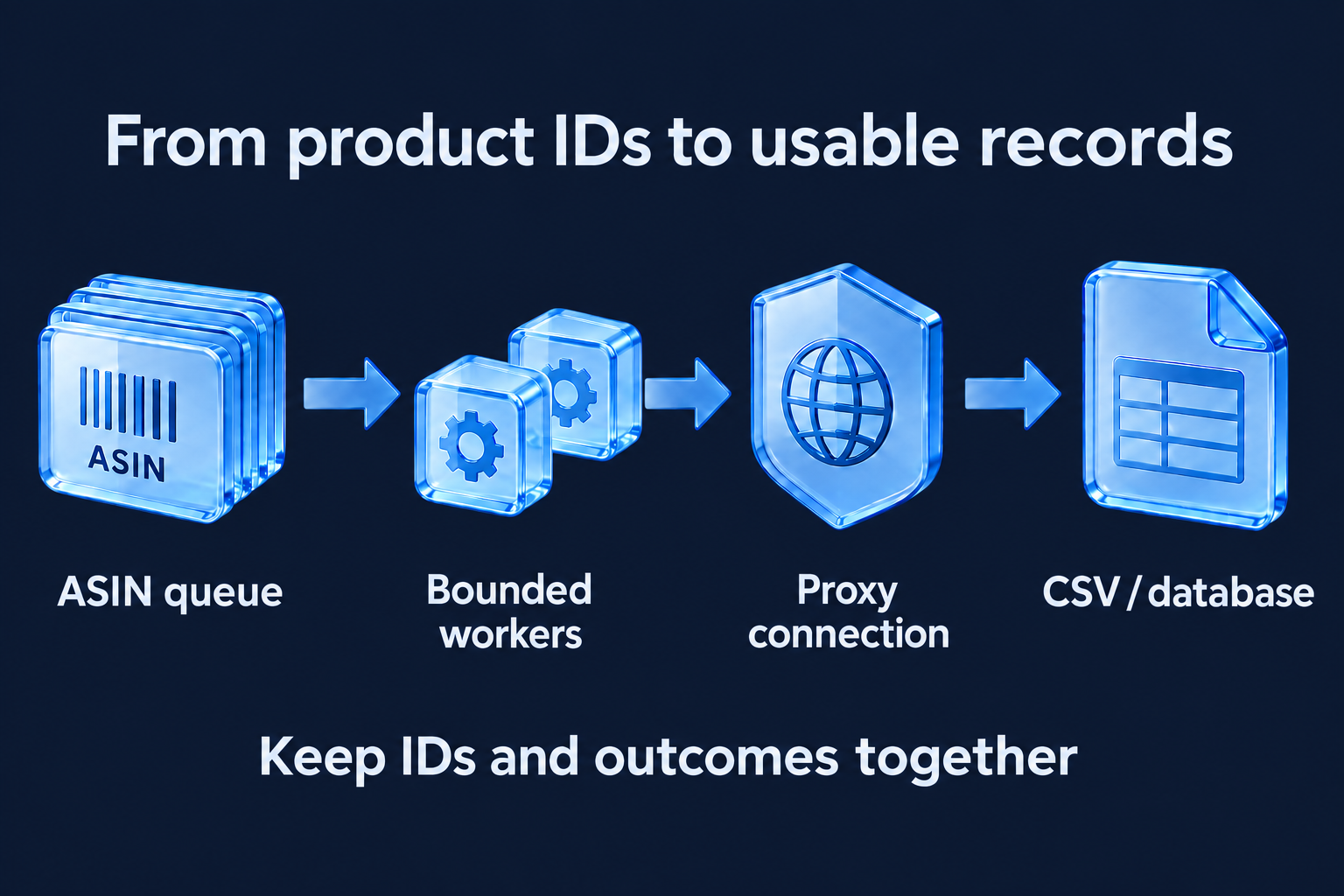
The pipeline is an ASIN queue, a bounded set of asynchronous workers, a configured proxy connection, and a structured CSV or database export. Keep product identifiers and outcomes together so failed requests can be retried and successful records reconciled. The illustration does not specify a guaranteed worker count or bandwidth requirement.
A scraper that handles 3 ASINs and a scraper that handles 50,000 ASINs are architecturally different systems.
The single-threaded approach above works for spot checks and price monitoring of a defined product list. For continuous collection — competitor catalogs, category-level price intelligence, inventory tracking, you need a queue-based architecture with async concurrency.
The core pattern: asyncio + curl_cffi's AsyncSession for concurrent requests, a work queue of ASINs, and a results writer that flushes to CSV or database in batches. Concurrency of 5-10 workers is the practical ceiling for Amazon before behavioral flags accumulate. Beyond that, distributing across multiple independent sessions with separate sessid values is more reliable than increasing concurrency per session.
#python
# Async Amazon scraper — concurrent ASIN processing with rate limiting
import asyncio
from curl_cffi.requests import AsyncSession
import random

async def scrape_asin_async(session: AsyncSession, asin: str, proxies: dict) -> dict:
    # Poisson delay per worker — independent timers prevent burst patterns
    await asyncio.sleep(random.expovariate(1 / 2.0))
    url = f"https://www.amazon.com/dp/{asin}"
    response = await session.get(
        url, headers=HEADERS, impersonate="chrome124", proxies=proxies
    )
    # Parse response with BeautifulSoup as in full scraper above
    return {"asin": asin, "status": response.status_code}

async def scrape_batch(asins: list[str], concurrency: int = 5):
    semaphore = asyncio.Semaphore(concurrency)
    async with AsyncSession() as session:
        async def bounded_scrape(asin):
            async with semaphore:
                proxies = get_proxies(asin)
                return await scrape_asin_async(session, asin, proxies)
        tasks = [bounded_scrape(asin) for asin in asins]
        return await asyncio.gather(*tasks)
For bandwidth planning: a standard Amazon product page is 150-300KB of HTML. At 5 concurrent workers with 2s average delay, expect 2-3 requests per second, roughly 170-250MB per hour of scraping. The 30GB plan at $1.90/GB covers approximately 120-175 hours of continuous collection, which maps to 430,000-630,000 product pages. For a one-time catalog scrape or weekly price monitoring run, the 10GB plan is sufficient. For daily continuous collection, 30GB is the right entry point.
Use code FIRSTPURCHASE for 80% off your first month, enough bandwidth to validate the full pipeline end-to-end before committing to a recurring plan.
The scrapers that fail on Amazon are built around evasion. The scrapers that run indefinitely are built around legitimacy simulation.
The difference is architectural. Evasion means adding headers and hoping. Legitimacy simulation means matching every layer Amazon evaluates: the TLS handshake looks like Chrome, the IP has the reputation of a real shopper, the timing pattern matches human browsing distributions. Amazon can't block traffic it can't distinguish from its own customers.
That's what the three-layer stack delivers. curl_cffi handles the fingerprint. Rotating residential proxies from a real-device network handle the IP reputation. Poisson-distributed delays and sticky sessions handle the behavioral layer.
The result — 99.95% success rate across a production amazon scraping python pipeline, isn't a claim. It's the measured outcome of all three layers working together. Each layer in isolation gets you partway there. The stack gets you to reliable.
For teams scraping Amazon at scale, the bottleneck stops being access and starts being data engineering: what you do with the product titles, prices, and review counts once they're clean in a CSV. That's the problem worth spending time on.
Check the most Frequently Asked Questions
Which proxy is recommended for Amazon research?
Why does my Python scraper get blocked even with good proxies?
What is the difference between rotating and sticky sessions for Amazon scraping?
Can I use a proxy to collect Amazon data?
What is an Amazon proxy?
Here’s how Profile Peeker enables organizations to transform profile data into business opportunities.
Scale your scraping strategy with high-quality residential IPs ensuring stable connections, low latency, and cost-effective results.
Ask AI about Magnetic Proxy